Copyright Information

Thank you for stopping by my blog! I hope you enjoy the things that I create and share! I do have a copyright on my original creations (see logo on my sidebar below).
If you create and post a creations based off of mine, please refer (with a link) back to my blog. Please do not use my ideas for files, profit or for contests. Thank you!


My Craft Goals for 2015

My Goals for 2015:

1. Update my goals for 2016 in January of 2016 :)
2. Maximize my crafting time!
3. Keep plugging away at scrapbooking photos!!
4. Learn how to Heat Press!!
5. Have fun!


Friday, July 23, 2010

Journal Note Pads (BIA)

I am finishing up my very first Scrapbook Design and You (SDU) class next week and I wanted to make a little something for my students.  This is my first time teaching this class and I am finding my groove!  One of the classes is all about the importance of journaling and I wanted to make a journal for each of the ladies to keep with them in their purses.  I am still without my Gypsy,so I had to remember how to use the Cricut the "old" way.

I took an inexpensive pad of watercolor paper and cut two sets of 3 1/8 by 5 1/8 rectangle for each notepad.  I also cut the same size (two sets each) of paper from a K&Co. paper pad.  I left the insides of the covers white, but sometimes I cover them as well.
To embellish the cover, I used Storybook for the accent frame.  I wanted "Once upon a Time" since this journal is for writing stories and tidbits that will help with journaling later on.  I guessed at 2 1/2 inches and got lucky!

I used my MS  glue writing pen to glue the frame down onto the accent blackout piece. 
I left the blackout pieces on my mat until the accent frames were glued on.
I inked the edges of the covers with StazOn black ink and a fantastix.  I got this technique from MakeupGirl217.
I got out my trusty Bind It All.  I used my new Space Bar so the holes are punched a little closer to the edge.
I centered the cover and back (flipped the way it will be once assembled) and pushed the lever down.  I have to stand up in order to do this!!

The pages of the note pads are 3x5 blank index cards.  I just stocked up on several packs as the back to school supplies are everywhere!  I use 40 sheets per note pad.
To assemble, put the note pad together the way it goes, then flip the back cover over the top as if the binding is on **the back cover is the top, the cover is the middle and the pages are on the bottom of this photo. 
You put the o-wire in so that the loose pieces are threaded through the back, front and then the pages.  You want the connected pieces to end up in the back of the note pad.
You stand up the note pad with the o-wire down, then push the lever down.  This will bend and close the wire.
If you are not careful, you can cut too close to the edge!!  I am glad I did not glue on the embellishment yet!!

Here are the finished note pads!
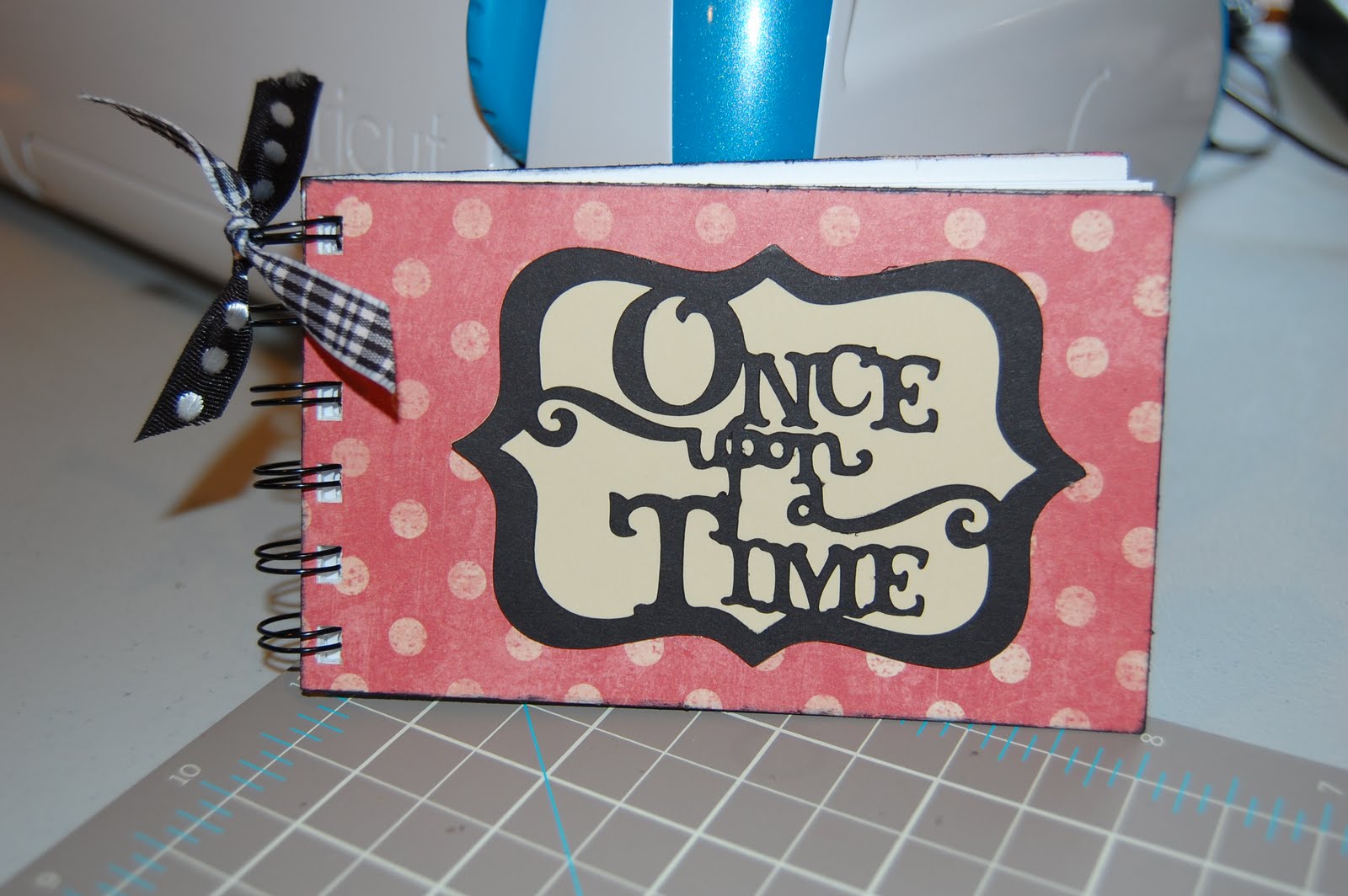
A close up!!

Wednesday, July 21, 2010


I have six students in my first SDU class at Michaels!!  Our last class is next Tuesday and we are all getting together in August for a crop!

I have a new set of classes starting on August 10th at Michaels on L Street.  For additional information on SDU click HERE.

If you are in the Omaha area and would like more information, please leave me a message and a way to contact you!

Monday, July 19, 2010

Having a Blue day...

I made this monocromatic layout for my Scrapbook Design and You class to use as an example.  The colors fit me today!!

This photo was taken last summer on our last day of vacation.  We go to the Ozarks in Missouri every August and last year we brought our friends with us.  We stopped in Kansas City to watch a KC Royals baseball game on the way home.  This is my friend Suzi and her daughter Danielle.  Danielle is the owner of my baby bug and my surrogate scrapbooking daughter!!

I used Wall Decor and More for the font and got very lucky when I guessed the size of the letters on my cricut!

I am a little down today for a couple of reasons.  My son's baseball season ended last night with a second place finish in districts.  We were tied going into the bottom of the 7th......so close but yet so far!  This is very bittersweet!  No more baseball 4-5 times a week.

That would be great if I had my Gypsy as I will have tons of time on my hands!!  Maybe today will be the day she returns....

Monday, July 12, 2010

Grandma's Pond


I have been working on some layouts to use as samples for my Scrapbook Design and You classes at Michaels.  Here is a layout of my son Tanner and my niece Sabryna feeding the fish in Grandma's pond.  I am using the colors purple, green and orange and I followed a sketch I saw on the LID challenge on the Cricut Layout forum.  This sketch was from last month so it is too late for me to enter it!!

These two are just precious ~ they are 6 weeks apart and I take many photos of them together.  Someday I want to make a cousins album of them!!  Also, just before this photo Tanner fell into the pond!  At 4 1/2 I did not think he would need an extra outfit for a visit to Grandma's!!

I used Storybook for the font.  Since my Gypsy is still on vacation (she just extended her stay) I was forced to use my Cricut without her.  This is challenging for me now as I have a hard time guessing what size of letters I need.  I only wasted a little paper....

Wednesday, July 7, 2010

Stars & Stripes Challenge

The Gypsy challenge on the Gypsy ChitChat Message Board was to use your Gypsy and stars and/or stripes. 


I am still waiting for my Gypsy to return home from her "spa" trip.  I borrowed my friend's Gypsy and found a star that worked on Home Decor.  The star has a swirl coming down one end.  I used Hide Contour to erase the inner star.  Then I copied the star and flipped it.  I welded the two together lining up the x axis.  I repeated the copy and flip (this time flipping upside down) and welded together.


Layer 2 had a 4 x 6 square on it to represent the photo.  I ended up tilting the frame because it looked better with the actual photo.


My layout was missing something, so I added Tanner's name and used the same star for the "A".  I used San Serif for the font.


I added some faux stitching around the edges of the paper.  Then I added a little bling:  red stickles and star shaped gems and here is the final layout.

Monday, July 5, 2010

Cousins and Friends Mesh Together


Hi ~ I am a Guest Designer today on Sassy's blog ~ Sassy has pulled me out of my funk more than once with her challenges and her projects and I am grateful for the opportunity!  Many of you know that I am waiting for my Gypsy to get back home.  She got a deep wrinkle in her chin (cracked screen) back in May.  She went to the spa for a facelift, and played a little trick on me by giving her plane ticket to a look alike.  I had to send the look alike back to PC (they forgot to serialize her) and here I am again not-so-patiently waiting for her to come back!

Lucky for me, my friend Crista is busy planning her niece's wedding and has loaned me her Gypsy!


This is a photo of my cousin Kristin and I taken this Easter.  We were very close growing up, but now live in different states and don't get to see each other very often.  I long for the days that we swam, rode bikes and giggled for hours on end!


I started my mesh with Gypsy Wanderings.  I selected the Border option of the Shoe button.  I put two of the borders on my mat.

From the Advanced Menu I kerned the two borders to -.60 and welded them.  To weld, first you need to group the two borders from the Basic Menu, then select the Weld button from the Advanced Menu.  I always preview (eyeball button) to see that it welded.  The red lines are the cut lines, the gray lines do not cut.

Next, I copied the welded image (two borders) and moved it down.


In order to line the two up perfectly, use the x coordinate.  My original mesh is at 2.45, so I highlighted the copied mesh and set the x coordinate at 2.45 by tapping the number in the x coordinate box.  The number key pad will enlarge and you can enter the number you need ~ this time 2.45.


Once they are lined up, I flip the bottom row.

Next, I move the bottom row up to overlap the top row and weld together.


Once you have welded the two lines together, you can repeat this process by copying the two lines, lining up the x coordinates, flipping and then moving and welding it together.  Depending on how big you want your mesh, you can keep going.

NOTE:  Once I meshed together 4 rows I saved my project.  This way if I needed to make any changes I could scrap the project and start back at this point!!

After I made my test cut, I realized that my mesh was a bit tall.  I went back to my saved project (4 rows) and added 3 more instead of the 4 I originally planned on using. 


Meshes are very delicate so be very careful when removing them from your mat.  It is helpful to use cardstock or similar thickness when cutting a mesh.  I had my E set on High speed, Max pressure, and blade at 5 (my normal setting for the blade). 


I used my dental tool to weed the mesh.


I used my 9" Xyron to adhere my mesh to my paper.  If you don't have a 9" Xyron, you can use a glue pen with a fine point. 

Once I run the mesh through the Xyron, I rub the top of it.  This helps with the extra sticky pieces that like to stay behind.  I also use a white eraser from a mechanical pencil to remove some of the remaining stick.


I peel the backing off and roll it up similar to weeding my vinyl. 


Here is the mesh glued down.


I matted the photo on brown metalic cardstock and used pop dots.


I love this paper, but this is way too busy for me!!  I also wanted to add a spot for journaling so I pulled out the Gypsy again.  I found this frame in Heritage and used Hide Contour to hide the inside cut.  I put two frames together and welded them like a card.  Then I grabbed my title "Cousins" from Sans Serif.  This is a very plain font and perfect for such a busy page.


I put down a border on the bottom of the page using the same metallic brown paper I matted the photo with.  I glued down my title and hidden journal spot!


I added a gold sheer ribbon, some flowers and a little bling.  The paper I used is from the Songbird paper pad by DCWV and metalic cardstock both from Michaels.

I hope you try a mesh if you haven't already ~ they are fun and unexpected!

Thanks again Sassy ~ it is always an honor to be on your blog!!


Thursday, July 1, 2010

Make A Mesh!

This is the sample card I made for my class at Michaels this week.  I demonstrated how to make a mesh background.  I used Gypsy Wanderings for this card since all of my Gypsy students have this one!!  This is a teaser ~ I will have detailed instructions for making a mesh on Monday here and on Sassy's BLOG.


Here is my friend's Gypsy (mine is not yet back from the spa) and I laid out the mesh, butterfly layers and sentiment all on a 12x12 mat.  On Layer 2, I put a 5 1/2 x 4 1/4 square to represent the card.  I can see this rectangle as I size the mesh.


I used a pop dot to raise up the butterfly.

I like making meshes to use as backgrounds ~ you have to look close to see what is in it!
