Copyright Information

Thank you for stopping by my blog! I hope you enjoy the things that I create and share! I do have a copyright on my original creations (see logo on my sidebar below).
If you create and post a creations based off of mine, please refer (with a link) back to my blog. Please do not use my ideas for files, profit or for contests. Thank you!


My Craft Goals for 2015

My Goals for 2015:

1. Update my goals for 2016 in January of 2016 :)
2. Maximize my crafting time!
3. Keep plugging away at scrapbooking photos!!
4. Learn how to Heat Press!!
5. Have fun!


Showing posts with label cricut. Show all posts

Monday, November 17, 2014

Mickey Ornament (The Buckle Boutique)

***This was scheduled for  November 10th but blogger did not auto post when I was out of town!


Hello - I am featured today at The Buckle Boutique Blog with a Sparkly Christmas Ornament.  It is that time of year when crafty people start making holiday gift and home decor items!!!  I wanted an ornament to remember our Disney trip this year. 

I cut a Mickey Head out of a Resin Rhinestone Sticker Sheet from The Buckle Boutique.  I used my cricut and the Disney Font cartridge.  I put the sticker sheet face down on my cricut mat.  I tape all around it with clear packing tape just in case my mat is not sticky enough!!
I use the Deep Cut Blade set to 6 and Multi Cut set to 2. I slow down the speed to Medium, but sometimes the Gypsy has a mind of her own concerning the speed!!

Once I had the Mickey head cut, I gently popped it out and set it aside.

Next I opened my Silhouette Studio and used Waltograph font from my computer and curved the words and numbers to fit my ornament shape.

For a tutorial on this, you can go HERE.

Here is the vinyl after I cut it out and weeded it.  I used clear contact paper from the Dollar Tree to transfer the image to my flat round glass ornament.
This photo shows the sparkle of the Resin Rhinestones and the ribbon.
I can't wait to hang this on my Christmas tree!!

What are you creating for the holidays this year?


The Buckle Boutique's Link Listing
The Buckle Boutique's Website . . . click HERE
The Buckle Boutique Blog . . . . click HERE
Facebook Page . . . click HERE
Twitter Page . . . click HERE
Pinterest Page . . . click HERE


Friday, October 24, 2014

Disney Autograph Album Pages


Happy Saturday
and 
Welcome to this year's Blog Hop for...
Rett Syndrome Awareness
 
In this hop we will be showing you many Disney themed projects while sharing with you about
Rett Syndrome.
If you have just stopped by my blog to visit with me, thank you and welcome, but please start at the beginning of the hop with our
Hostess, Robin from
Create-A-Latte.
We would not want you to miss any of these wonderful projects.

So, grab yourself a Latte', sit back and hop along with us as we share our projects with you.
 October is Rett Syndrome Awareness Month, so I wanted to help get the word out and what better way to do that than with a blog hop.
  
Rett Syndrome strikes without warning. A girl with Rett Syndrome usually starts out as a happy and healthy baby. Then something goes terribly wrong. She loses the ability to speak, she can't use her hands to play with toys, or to even feed herself, and she may lose the ability to walk. 
Despite their physical disabilities, girls with Rett Syndrome are believed to be functioning mentally at a much higher level than previously thought.   
Rett Syndrome is caused by a mutation of the MECP2  gene on the X chromosome.  
Rett Syndrome is found in all racial and ethnic groups throughout the world, and in every socioeconomic class.  
Rett  Syndrome affects in 15,000 female births.  

*Symptoms of Rett Syndrome...

Rett Syndrome is a genetic neurological disorder that affects girls between 6 and 18 months of age. This regressive disease leads to lifelong handicaps, including loss of speech and voluntary muscle control, and is often misdiagnosed as Cerebral Palsy or Autism. Symptoms range from mild to severe, and almost always include...
*Developmental Regression or Plateau
*Near constant hand clasping or wringing
*Severe communication impairment
*Breathing problems
*Digestive issues
*Floppy arms and legs
*If able to walk, then with a shaky, unsteady gait, or toe-walking. But most do end up using a wheelchair for the most part.
*Scoliosis
*Seizures
*Slowing head growth
*Abnormal sleep patterns
*Transient loss of social engagement
*Poor circulation that can lead to cold and bluish arms and legs
*Anxiety
  
Many individuals with Rett Syndrome live well into adulthood, although there are some that do not get that chance and end up losing their battle to Rett Syndrome at a very early age.
Most people including Doctors are not aware of Rett Syndrome, so, please help me get the word out about Rett Syndrome and hopefully the more that know the faster we can help in finding a cure.

For more information you can visit...
http://www.rettsyndrome.org/

Now, are you ready for some blog candy???  We have a several wonderful and generous sponsors today...


1.  Lucy Kelleher
with Close to My Heart
$10 gift certificate for Close to My Heart products with Lucy 

Close To My Heart


2.  Dee's Delights Store
$20 Gift Certificate for Dee's Store


3. Heather Stafford with...
Gemini Red Creations
A floating locket and your choice of two floating charms 


http://www.geminiredcreations.com/shop/floating-lockets/
 

4.  Diana Larson with
DLART
$10 Gift Certificate for DLART Store


https://www.etsy.com/shop/DLART

5.  Robin Lane with
Create-A-Latte
A Collection of Snap Products by Simple Stories. Everything you need to put together your Disney memories.
The kit comes with an Album, a pack of Insta Pocket Pages, "Say Cheese" Journal Kit, and the "Say Cheese" Snap Pack.


Without further ado...Our Disney Projects.

I felt honored to be asked to join this hop and spread awareness about Rett Syndrome!
We are headed to Walt Disney World in a couple of weeks.  This is not our first trip, but it is the first time we will go close to Christmas time!  Every time we go, I pre-make an 8 x 8 scrapbook album for autographs and pictures for my youngest son.  His older brothers are 19 and 24 and no longer want an album!!  Because Tanner is 9, he wants less autographs and more photos in his album.  We are eating some character dining breakfasts and dinners, so I made sure to include those pages.  I also leave some generic pages just in case he wants an autograph or two.

I started with the above images that I found on Pinterest.   With the help of some friends, I traced and cut the images on my Cameo.
I made two 2-page spreads that will hold a 2x3 picture that I can print off with my Zink hAppy printer using photos from my cell phone.
 I matted the photo areas with black cardstock.  I added washi tape on the green pages.
I know he will LOVE the 7 Dwarf Mines ride, so I cut this roller coaster set from the Silhouette Store using my Cameo and added these stickers.
We are spending part of a day in Downtown Disney and will go bowling at Splitsville.  I used this bowling border from the Silhouette store. 
We are also planning a hot air balloon ride.  I cut the clouds and hot air balloon from cuts found in the Silhouette Store.  I used a font from my computer called Walt Disney Script (found on dafont.com) for my words. 
This simple page was cut with my cricut.  I used Mickey Font for the words and added stickers.  I made three sets of pages like this for all the characters we will see at breakfast. 
 These next pages were designed in Silhouette Studio and printed out.  My mother-in-law just loves the Haunted Mansion!!  I could not resist!!  I found the three ghosts on Pinterest.
These images were also found on Pinterest and printed out on red cardstock. 
Another favorite image from Pinterest printed out.  I made a second page just like this one! 
I printed Mickey and Minnie on these pages and cut out the words on my Cricut.  These images were also on Pinterest. 
I printed Donald and the words.  Donald was found on Pinterest and the font was from my computer. 
I printed the pink castle (from the Silhouette Store) and layered the words on top.  I printed out 6 of these.  They won't reveal which princesses will be at the restaurant yet, so I have stickers to add later. 
 The Sci-Fi Dine-In Theater is a fun one.  You sit in a car at the drive in and eat!  I used images from the Silhouette Store and a font on my computer to create and print these pages.

My favorite part of  Disney is feeling like I am 4 years old EVERY time I go there!!!  I hope your Disney Dreams come true!!


Be sure to head on over to....

An Geon


for your next stop and see her wonderful project that she has made to share with you today.

If you get lost along the way here is the entire line up for today's Blog Hop.
1. Robin L. ~  http://create-a-latte.blogspot.com/


Thank you for hopping along with us today, I hope that you have learned something about Rett Syndrome and that you will help spread the word so that we can make as many people aware of this as possible. I also hope that we have inspired you to get your craft on.

Tuesday, September 16, 2014

Blinged Out Pumpkin

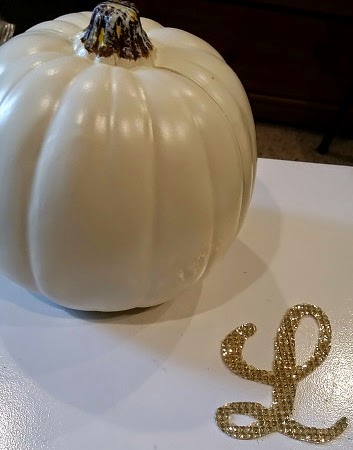
Halloween is my favorite holiday!!  I love the fall colors and decorating my house and daycare.  I found two different pumpkins on Pinterest that I loved - so I combined the two designs together.  I put my "L" on the front and gems on the top.

I purchased a 5 inch creamy white foam pumpkin from Michaels. 
My "L" was cut from a piece of gold Buckle Boutique Rhinestone Resin Self-Adhesive Sticker Sheet.  You can find these HERE (some colors are on sale right now too)!

I used my Gypsy with my cricut expression.  I got the "L" from Quarter Note.  I measured my pumpkin and determined the "L" should be around 3.5 inches.  I sized my "L" to 3.59 inches.  

I flipped the "L" to cut it out in reverse. 
The Rhinestone Sticker Sheets cut best face down on a sticky mat.  My mat is not as sticky as I would like, so I taped the edges down too.

Here are the instructions for cutting with a Cricut:

Cricut
  1. Use a deep cut blade
  2. Place your blade depth at 6
  3. Use a mulit-cut of 3 or 4 depending on how new your blade is
  4. Put your speed on slow
  5. Place the product face down on the Cricut cutting mat, making sure it is in a very sticky spot.  I usually run my hand over it to really make sure it is stuck down.
  6. Use Flip Mode on your Cricut  (since you have the product upside down, you need to flip the cut for the image to be correct when you flip it over)

Here is the "L" cut out.  I peeled the backing off and stuck the "L" on the flattest side of the pumpkin. 
It looks pretty, but I wanted a little more sparkle!! 
I purchased these gems from Michaels,  The pack includes clear, gold, dark grey and black crystals in 3 sizes.  I used Beacon 527 glue to adhere them to the top of the pumpkin.

I put 5 or so dots of glue on at a time and stuck the gems on. 
I am so happy with how this turned out!!

I hope you have a Blingy Fall!!


The Buckle Boutique's Link Listing
The Buckle Boutique's Website . . . click HERE
The Buckle Boutique Blog . . . . click HERE
Facebook Page . . . click HERE
Twitter Page . . . click HERE
Pinterest Page . . . clickHERE

Tuesday, August 12, 2014

Teacher Gift Card Holder

Today I am featured at The Buckle Boutique!!

I decorated this tin box to use as a gift card holder for Tanner's teacher.

I like to spoil his teachers at the beginning of the year, middle of the year (Christmas) and end of the year (Teacher Appreciation Day)!
I found an apple on the Plantin Schoolbook cartridge (Roly Poly function key) and used my Gypsy to size it to 2.05 x 2.18 to fit my tin.  

I used some red Dazzling Diamonds rhinestone sticker sheet.  It cuts in the Cricut Machine with a deep cut blade set at 6, speed 1 and sometimes it needs a multi cut.  The mat needs to be super sticky and to be sure I use packing tape to tape the edges of my sticker sheet down.  It cuts best face down so make sure you reverse your images before you cut them out! 
Here is the Cricut in action. 
You can see the cut.  This one was a single cut (no multi cut).

I just peeled the sticker sheet off the mat and popped out the apple. 
Very shiny!!  I love how you can cut through the diamonds as they are made out of a gel substance. 
I put the apple on the front of the tin window.  I used a black and white polka dot washi tape around the edge of the box. 
I used a scrap of black vinyl to cut Ms. Hunt's name and adhered it to the front.  This way she can re-use the box for some small trinkets or storage. 
I popped in the gift card and added a tulle ribbon.

You can find the red Dazzling Diamond Sticker Sheet HERE!

The Buckle Boutique's Link Listing
The Buckle Boutique's Website . . . click HERE
The Buckle Boutique Blog . . . . clickHERE
Facebook Page . . . click HERE
Twitter Page . . . click HERE
Pinterest Page . . . clickHERE


Tuesday, June 10, 2014

The Buckle Boutique Lips

I am so excited to be featured at The Buckle Boutique today!!!

I decorated a compact today with some blingy lips!!
I cut out a set of red rhinestone sticker sheet lips from Don Juan on my cricut machine.  I hid the inner cuts as they were pretty detailed and I wasn't sure how well it would cut.

I cut my rhinestone sticker sheets blingy side down and I use packing tape to keep the sticker sheet in place.  I use my Deep Cut Blade set to 6, my speed at 3 and my pressure at 3.

Once I cut the lips out, I took my coated cutter bee scissors and cut the lips apart and trimmed out a curve on each lip. 
Now when I grab my compact - I see some luscious lips blinging at me!!


The Buckle Boutique's Link Listing
The Buckle Boutique's Website . . . click HERE
The Buckle Boutique Blog . . . . clickHERE
Facebook Page . . . click HERE
Twitter Page . . . click HERE
Pinterest Page . . . clickHERE

Tuesday, November 26, 2013

The 12 Days of Christmas Blog Hop Day 2 - Wine Glasses


Welcome to Day 2 of the Honeybearz Designs 12 Days of Christmas Blog Hop!!


We are continuing on with the second day of projects!  If you missed my post yesterday, you can see it HERE.

If you arrived from Lucy, you are in the right spot.  If you found me first, head over to the BEGINNING so you can see the blog candy as well as everyone's projects!!

Welcome to the 12 Days of Christmas Blog Hop. This hop will take place November 25th through December 6th and the new postings each day will be posted by 8 am eastern standard time. This hop will be full of wonderful ideas and inspiration to get you well on your way of creating all of those beautiful Christmas project. This is an awesome way to get a lot of your Christmas cards, and scrapbook layouts finished, home decorations completed and maybe even be inspired to create something using a new technique that you have never tried. There will be a new project posted each and every day by all the wonderful amazing ladies in this hop. Also each day we will have a guest designer or two for you to visit. Lisa our hostess will be giving away some wonderful blog candy each day of the hop from the amazing sponsors that we have for this hop. Lisa will be posting all the winners from this hop on December 10th. Every one has a chance to win including the ladies participating in the hop and even the guest designers and the sponsors. At the end of each post we will have a list of all the sponsors who are sponsoring this hop all you need to do is click on their name to go to their sites and check out all the wonderful sites. We want to thank each and everyone of the sponsors for their generosity. It has been greatly appreciated.

Here is a complete list of the sponsors:

Honeybearz Designs - Yummy Crafting Candy
http://honeybearzdesigns2011.blogspot.com/

Teresa Russell - $10.00 Gift Card from
her facebook group Scrapping For Less
https://www.facebook.com/groups/372187582880346/

Pazzles - Two digital download gift cards for a Cutting Collection of choice.
http://pazzles.com/

Kathy's Cozies - A custom Cozy for an Expression, Expression 2, Cricut Create, 
Cricut Mini, or Silhouette Cameo. Whoever wins can pick their own fabric.https://www.etsy.com/shop/KathysCozies

Paper Sweeties - $10.00 Gift Card
http://www.papersweeties.com/

ScrappyDew - $20.00 Gift Card
http://www.scrappydew.com/store/

My Creative Time - Stamp Set
http://www.creativetimeforme.com/

Little Scraps of Heaven Designs - $20.00 Gift Voucher
http://www.littlescrapsofheavendesigns.com/

Paper Creations by Mindy - $15.00 Gift Certidicate
http://www.papercreationsbymindy.com/

Pretty Paper, Pretty Ribbons - $15.00 Gift Certificate
http://www.prettypapergraphics.com/

Xyron - 2 Teresa Collins Adhesive Kits
http://www.xyron.com/enUS/Home/default.html

Joys Life - "Oh Christmas Puns" stamps
http://joyslife.com/

Timeless Twine -$15.00 Gift Certificate
http://www.bellacreationz.bigcartel.com/

Too Cute by Jessica - $25.00 Giftcard
http://www.toocutebyjessica.com/

Designs on Cloud 9 - $20.00 Gift Certificate
http://designsoncloud9.com/

LoveBug Creations - $15.00 Gift Certificate
http://www.lovebugcreations.net/

The Paper Parade - $40.00 Gift Certificate
http://www.thepaperparade.com/

The Paper Nest Dolls - $25.00 Gift Certificate
http://stamps.the-papernest.com/

Jessica Douglass Wilson -$10.00 to her Close To My Heart store 

Lettering Delights -a gift valued at $10.00
http://www.letteringdelights.com/

Scrapping Bug Designs - $50.00 gift certificate the gift 
certificate excludes sale prices.
http://www.scrappingbugdesigns.com/

3 Girl Jam - $10.00 Gift Certificate
http://www.3girljam.com/

SVG Attic - $25.00 Gift Certificate
http://www.svgattic.com/

Pinque Peacock $10.00 Gift Certificate
http://pinquepeacock.blogspot.com/

SVG Cuts - $20.00 Gift Certificate
http://www.svgcuts.com/

Blue Moon Creations - 12 digital images
http://www.bluemooncreation.net/

Sherri Baldy Stamps - $15.00 Gift Certificate for digi stamps
http://sherribaldy.blogspot.com/


I used my cameo to cut the red vinyl.  I welded two different fonts to create Cheers and naughty.

The gold L is Self Adhesive Resin Rhinestone Sticker Sheet from The Buckle Boutique.  You can find them HERE.  I cut this material on my cricut and adhered it to my wine glasses.

Cutting on the cricut is not hard but you need to remember a few tips:

You need the deep cut blade and housing set to 5.  A sharp blade works best.
A sticky mat is a must (re-stick if necessary).  I usually tape the edges, but if your letter has a lot of details you want it to stick down pretty good!!
Place the sticker sheet bling side down on your mat (don't forget to reverse your image).
Cut - I only cut once.
Gently pop out your cut.

I use rubbing alcohol to clean the glass surface.  Once the glass is dry, you can adhere the vinyl or rhinestone sticker!

Thank you for stopping by!!!

Your next stop is Beth's Blog


Here is a complete list of blog addresses in case you get lost along the way:

6. Miranda - www.nanasscrapspot.com
8. Scrappin Toxic Midge- http://www.toxictreasures.com/
14.  Lucy ~ http://love2createitall.comhttp://www.love2createitall.com/
16. Beth~ http://thecraftyscrapyard.blogspot.comhttp://thecraftyscrapyard.blogspot.com/****NEXT