Copyright Information

Thank you for stopping by my blog! I hope you enjoy the things that I create and share! I do have a copyright on my original creations (see logo on my sidebar below).
If you create and post a creations based off of mine, please refer (with a link) back to my blog. Please do not use my ideas for files, profit or for contests. Thank you!


My Craft Goals for 2015

My Goals for 2015:

1. Update my goals for 2016 in January of 2016 :)
2. Maximize my crafting time!
3. Keep plugging away at scrapbooking photos!!
4. Learn how to Heat Press!!
5. Have fun!


Showing posts with label Baby. Show all posts

Wednesday, March 25, 2015

Baby Onesie T-Shirts

I got a new toy - a heat press!!  I am having tons of fun creating little shirts for babies!!!  Here are some of my latest:
From one of my favorite books!

This is for my friend - her husband is a police officer and they are expecting a boy!

Every boy needs cool shades!

I just love the "Hello I'm new here" shirts!

I have a new Facebook Group with all of my crafty items.  If you are interested in them, you can check it out HERE.

Monday, October 6, 2014

Burlap Baby Keepsake

Hello - Today I am sharing my project with my good friend Sheila from She's A Sassy Lady.  I have a big favor to ask of you - will you please click the link to her blog and tell her Congrats for being Cancer Free 1 Year this month!!!  She battled breast cancer and is finally back to crafting and creating - I was so happy to share her news!!!!!

I made a gift for a special new baby!  Owen will join my home daycare in December.  He is the fourth child in the family and I am so excited to have this family for several more years - they are so good to me!!!

I got the design idea from Pinterest.  I have made several of these keepsakes out of vinyl, but this is my first burlap one and I really love it for boys!!
I started with this burlap product found at Wal-Mart.  It is laminated on the back side and sized to 8 1/2 x 11. 
I used my Silhouette Cameo to design and color in my words and hearts.  You can see my design process here - different fonts and phrases.  I had two different models, but liked this one the best.

I moved the image over to the top left side of my mat, making sure the overall design was within 8 x 10 inches so it would fit in my frame. 
Instead of sending the image to my Cameo to cut, I sent it to my printer. 
I went into my printer settings and changed the paper to "Other Specialiy Paper".  I loaded my burlap into my printer laminated side up (my printer pulls in the paper and flips it over - you may need to check your printer). 
I trimmed off the edges so it fit in the frame.
Ready to put in the gift bag - I just love making personalized gifts!!!
Isn't he just precious?!!

Thursday, April 24, 2014

Baby Gift - Personalized Float Frame

We have a new baby in the family!!  My step-brother and his wife just welcomed their third child and I wanted to make something special for him.

I got this float frame from Michaels and started creating on my cameo.  The white background is a sheet for photo taking purposes only, the wall color will show through.

Mom's favorite bible verse went on the frame.

I love making these for new babies!!!

Tuesday, November 12, 2013

Baby Mini Album


I am so excited to be featured at The Buckle Boutique Blog today!!!

I made a baby mini album to give as a gift.  I cut 4 pieces of chipboard into 5x7 rectangles for my pages.  I covered each page with scrapbook paper and adhered them with ATG tape.

I used Rhinestone Adhesive Sticker Sheets from The Buckle Boutique for "baby" on the cover.  You can get more information (or purchase some) HERE.

These are awesome - you can cut them in your Cricut Machine, Pazzles, Big Shot, Cuttle Bug and more!  The crystals are gel so you can totally cut on a curve!!

I use my Cricut to cut my letters.  I used my Gypsy to reverse the letters (you want to cut the paper backing side not the gel crystal side) and used my Deep Cut blade set to 5.  I just popped them out of the cuts and peeled off the paper backing!


I used images from the Nursery Tail cartridge and my Cricut Imagine for the embellishments.

I cut my photo mats to either 4.25 x 4.25 or 4.25 x 6.25 to fit photos.  I pop dot the embellishments in the corners to mom can slide the corner of the photo under.


More from Nursery Tail.


These cuts came from the Online Silhouette Store.  I put a pocket in my mini albums so mom can journal and add extra photos inside.


I used my Bind-It-All to bind the album.

I just love the sparkly title of my album!!!

The Buckle Boutique's Link Listing
The Buckle Boutique's Website . . . click HERE
The Buckle Boutique Blog . . . . clickHERE
Facebook Page . . . click HERE
Twitter Page . . . click HERE
Pinterest Page . . . clickHERE


Monday, November 4, 2013

Baby Gift (Vinyl)


A friend of mine just had a baby girl.  She is one of my daycare moms and I am so excited to have a girl coming!!!  We are boy heavy over here!  I have been wanting to make one of these Baby Subway Art Frames for a while now.


I found this float frame at Michaels on sale.  I removed the pictures and used goo gone to get rid of the sticky residue from the tape that held the pictures on the glass as well as the price tag.  I never understood why they put sticky labels on glass!!!

The dimension of this frame is 6" x 12", but the inner glass measures 5.5" x 11.5".


I put a rectangle on my mat sized to 5.5" x 11.5".

I opened a new Layer (while leaving the rectangle visible) and started putting some words and numbers on my mat.  I typically try out a couple of different fonts before I find what I want.

I ended up using Nursery Rhyme for: Mackenzie, Marie, and It's a Girl.

I used Plantin' Schoolbook for:  7pounds 9 oz and 21.5 inches.

I used Martha Stewart Elegant Cake Art for:  October 9, 2013.

I used the settings 3-3-3 for a kiss cut for my vinyl (Speed 3, Pressure 3 and Blade Depth 3).


Here are my tips for creating you own Subway Art:

Play with several types and sizes of fonts
Look at Pinterest for different ideas
If you need a comma or period, sometimes you need to use the semi colan and hide the piece you don't need
If you don't have a float frame, hot glue the glass to the back of the frame
Cut with paper first - especially if you only have one piece of vinyl to work with!


I used Cricut Transfer Tape to transfer the vinyl onto the glass then assembled the frame.

I sometimes use clear contact paper from the dollar store instead of transfer tape as it is not as sticky as the regular contact paper.  If I used regular contact paper, I "dirty" it up first by sticking it on my jeans so it is not super sticky.


Friday, September 13, 2013

All About Babies Blog Hop


Welcome to the “All About Babies” Blog Hop! So glad you can join us!

If you are looking for The Buckle Boutique Blog Hop, please go HERE.

If you are coming from SHAWN,
then you are in the right spot. If you just happened to stumble upon my
site or your reading this via e-mail, please start at MIRANDA'S BLOG so you don’t miss anyone’s amazing projects!


We will be showcasing anything BABY projects! In addition to seeing some
awesome projects, there is some blog candy available too!  Miranda will
be giving away a Michael's or Joann's gift card.  Winner's
choice!  To be eligible to win the blog candy, you must leave a comment
on each stop in the hop telling us what is your favorite summer time activity!  Be sure to leave a comment on each stop because the winner can be chosen from any of the participants blogs!


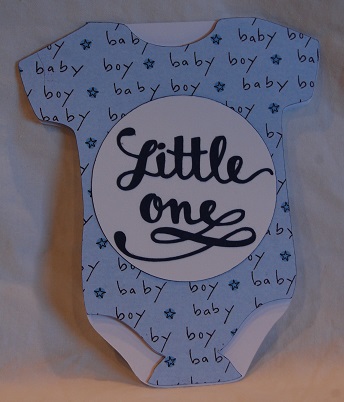
For my project today, I created a wall decor piece and a card for my friend who is expecting a boy. She is also a teacher, so I wanted to use this line from one of my favorite books!


For my canvas, I started with....

a flat 8x10 canvas painted cobalt blue.  I planned on putting white letters on the canvas but tried this pretty silver instead.

The silver was a bit translucent and did not show up very well....so onto plan B.


I painted over the entire canvas with 2 coats of white acrylic paint.  When completely dry, I peeled off the vinyl, I also painted the edges cobalt blue.

For the card I used a file from the Silhouette store:


I cut out the card shape in white cardstock AND baby boy paper from Hobby Lobby.

The Little One is cut from dark blue cardstock.


I cut a circle to fit behind the sentiment and still fit on the onesie.

Thanks so much for stopping by!!!