Copyright Information

Thank you for stopping by my blog! I hope you enjoy the things that I create and share! I do have a copyright on my original creations (see logo on my sidebar below).
If you create and post a creations based off of mine, please refer (with a link) back to my blog. Please do not use my ideas for files, profit or for contests. Thank you!


My Craft Goals for 2015

My Goals for 2015:

1. Update my goals for 2016 in January of 2016 :)
2. Maximize my crafting time!
3. Keep plugging away at scrapbooking photos!!
4. Learn how to Heat Press!!
5. Have fun!


Showing posts with label gypsy challenge. Show all posts

Saturday, November 20, 2010

Thankful Tag Challenge ~ Gypsy Chat

Each week there is a Gypsy Challenge on the Gypsy Chat section of the Cricut Message Board.  These challenges are designed to get us using some of the features of the Gypsy ~ this is wonderful for Gypsy users of all stages!

This week's challenge is:

Theme ~ Thanksgiving
Tag or Label ~ weld shapes to create
Buttons or brads
Thread or ribbon


The first thing I did was to weld 4 tags together side by side.  Once I welded the tags, I sized my project to be 11.5 inches wide.

I scored the tags where I welded them.  Then I scored and folded the bottom 1 1/2 inches.  This was my first attempt to sew the seams to make pockets ~ it is hard to see in this photo, but the lines were not very straight!

I tried again, but this time made the bottom fold 1".  I went back to the Gypsy and made smaller tags to put in the pockets.  I sized rectangles from George to 2 1/2" wide 3 1/4" tall.  I welded 4 circles to the top.

I inked this flower a little with brown ink.  I also inked the tags and pockets.  I had white thread in my machine, so I inked it brown so it blended in a bit.

Here is my sewing before I inked it!

I added a button inside the flower.  I strung ribbon through the holes.

Here is my tag folder all tied together.

And here it is opened up.  I am thankful for my Family, Friends, Health and Paper.  Yes, I have an addiction to paper.  I spent $25 on paper today after cleaning out my drawer yesterday.  Did I mention that my drawer broke under the weight of all my paper?!?

My name is Lori and I am addicted to paper!!!

Thursday, September 30, 2010

Pumpkin Patch ~ Gypsy Challenge

This week's Gypsy challenge is to create a layout or card using:  At least 3 cartridges, 1 word, 1 weld, 2 pieces of art, 1 squeezed image and 1 stretched image.

I used Don Juan for the title (word and weld), Pumpkin Carving for the pumpkin border (I stretched one pumpkin and squeezed one pumpkin) and Old West for the barn.


My son Tanner has a field trip tomorrow to the pumpkin patch!  We go to a pumpkin patch near our house that has a huge barn with a pumpkin painted on it that you can see from the interstate.  In order to make this, I had to cut out the barn 3 times.  For the brown barn, I used Hide Contour to hide all of the inner cuts.  I hid some of the cuts above the door on the red barn where the pumpkin will go.  I cut out the roof line and the door from the white barn. 

I cut the handle off of the orange pumpkin and glued it to the green one.


I did not want to waste a ton of green paper, so instead of making two sets of borders (one orange and one green) I used stamp ink to color the stumps.


Here is the barn assembled and glued down.

The scarecrow is from October 31 (the 4th cartridge I used).  Like the pumpkins and barn, this cut has no layers to it.  I cut it out three times, one in brown (with the inner cuts hid) once in blue and once in creme.  I just snipped the parts away that I did not want to use and assembled.


Here are the finished pages once again.  I will add a journaling box under the barn and stick the pictures on.

Wednesday, July 7, 2010

Stars & Stripes Challenge

The Gypsy challenge on the Gypsy ChitChat Message Board was to use your Gypsy and stars and/or stripes. 


I am still waiting for my Gypsy to return home from her "spa" trip.  I borrowed my friend's Gypsy and found a star that worked on Home Decor.  The star has a swirl coming down one end.  I used Hide Contour to erase the inner star.  Then I copied the star and flipped it.  I welded the two together lining up the x axis.  I repeated the copy and flip (this time flipping upside down) and welded together.


Layer 2 had a 4 x 6 square on it to represent the photo.  I ended up tilting the frame because it looked better with the actual photo.


My layout was missing something, so I added Tanner's name and used the same star for the "A".  I used San Serif for the font.


I added some faux stitching around the edges of the paper.  Then I added a little bling:  red stickles and star shaped gems and here is the final layout.

Tuesday, May 11, 2010

15 Border ~ Gyspy Challenge


This week's challenge on the Gypsy Chit Chat forum of the Cricut MB is Mix Em Up. You use 4 carts, 4 welds and at least of of the images is a shape.

I designed this border for my son who just turned 15 and is learning to drive. I welded letters, numbers and shapes from Designer's Calendar, Base Camp, Lyrical Letters, Cuttin' Up, Locker Talk, Street Sign, Doodletype, Going Places and Just Because Cards.

I wanted my border to be 2" x 12", so I put the images on a 12 x 24 mat on my gypsy. I started on the second inch in from the left edge and went to 13 inches from the left edge. I put my 3" x 12" paper on my 12 x 24 mat to cut. I learned this technique from Alicia Garcia's BLOG.

I used this blue paper to test cut my design. I will use red or dark blue on a layout (I am behind in his scrapbook since becoming a "girlie" designer lately ~ LOL)! I put the title on a piece of red paper so it would be easier to see.


A while ago I made a mesh of the number 15 and the word "fifteen" that was 9" x 12". I have not yet cut it out, but I think I like this border much better!!

Wednesday, April 28, 2010

In Remission LO

I am slowly but surely working on my very own scrapbook all about ME for the first time since I started scrapbooking 13 years ago. Why do we do so much for others and not for ourselves? That would be a whole separate blog post LOL!!

I found these photos of my mom taken in 1987 when she was in remission from lymphoma. Her cancer came back in December of 1988 and she passed away in March of 1989. She was given a bit more time with us and mom and dad took advantage by taking several trips.


This layout is loosely based off of the LID challenge from the week of April 23rd. I did not finish it in time to submit it. I did not add many details as I really did not want to take away from the photos. This is not how my mom normally looked. Here she has on a wig and she looks so fragile ~ but her smile brings her whole body to life! I used this paper from a K&co pad because she loved butterflies. I used my new cartridge Nursery Rhyme for the font.


The second layout is also from the LID challenge. This is a photo of my parents on a cruise after mom's hair grew back and she gained some weight back (she looks less fragile here). They both look so happy here ~ I just love her smile!!


I used Home Decor for the hearts and swirls. One of the recent Gypsy challenges was to mirror and weld images. I put one heart on the mat, copied it and flipped it so it would mirror the first one. I grouped them together and copied another set of hearts and flipped them. I welded them all together to make this embellishment. The swirls were done in a similar way. The swirl is also from Home Decor. I copied and flipped a swirl. I then grouped the two together and copied again. This time I rotated the second set of swirls to 90.00 and welded the corners together.

I cut out a circle from the same paper and used the reverse side with the butterflies. I inked the edge of the circle in black chalk, added a little ribbon and a flower to match the other page.

I just realized that I have lived half of my life without her. She was a very crafty lady and I am glad that the apple did not fall far from the tree!! Happy Mother's Day (a little early) Mom!

Monday, April 26, 2010

Gypsy Get Real Challenge


On the Gypsy ChitChat forum of the Cricut message board, we have weekly challenges. These challenges are great because part of the challenge is to use a specific feature of the gypsy. So we are learning and creating!! This challenge is to use the Real Dial button on the Main Menu page. It is a box with the letter "a" and an up & down arrow in it.

Real dial is a weird concept to grasp at first. When you select a size for your shapes or letters, not everything will cut at that exact size. For example, if you select 2" height for the word Love using the Gypsy Font, only the "L" is actually 2" tall. The "o v e" are less than 1" tall.

Another example of this is when you are working with paper dolls or a Disney character. You select your size (let's say 3 inches) and that size will be the shadow of the character. All of the other pieces will be cut at 3 inches as well, but they will be the correct size to fit the 3 inch character. You don't want 3 inch eyeballs for a 3 inch Mickey Mouse!!

Every now and then, we do want a specific size of a letter or piece of a character or layered item. We sometimes use pieces to make cards or designs by welding them with other pieces. In this case, by selecting the Real Dial Size button the letter or shape you select will be that exact size. If you want a 7" lower case "e" you can get one much quicker by using the Real Dial button.

For some fonts, the shadow feature is not an option, so this is a way to make a shadow. I selected Don Juan because it does not have a shadow option. I put my name on the mat and sized it to 2.0 ht with the Real Dial button on (yellow). I grouped and copied my name onto the mat. I ungrouped and moved the letter L over my first letter L. I then unlinked the chain so I could adjust the height and width separately until I found a good shadow. I repeated this with the remaining letters.


Then I took the star and made a total of 5 stars, each one a bit bigger than the one before it.


I arranged them on my mat to cut out by color and cut.

This was "Real" educational and a bit frustrating to get just the right size on the shadow layers. Depending on the shape or letter, you could only go so much taller or wider to keep things proportionate! It is very much a trial and error process.

Thursday, April 15, 2010

Straight From The Nest ~ Gypsy Circle Project


Hoot Hoot Hooray!!

This is the circle project I designed on my Gypsy for the first Gypsy Challenge, but my cart would not link so I had to send it back. It took a while to get my label no thanks to my magical "spam" folder I did not know I had.


I finally got my replaced cart and cut out my project. I inked the edges with brown stamp pad ink and used gold stickles for the eyes. I am now sure if I will use this on a card or in a layout ~ I just loved the owls in a circle like cheerleaders!!

Saturday, April 10, 2010

Gypsy Hop & Skip Project


This week's Gypsy Challenge is to use the Kerning feature in a project. The Kern button is on the Advanced Menu at the top K_E. The Kern feature will move items closer or farther away from each other. This is an easy way to "squish" items together for welding. We are to create two sets of kerned images, one set double the distance of the other.

For my project, I used the Kerning feature to move my items away from each other.

I wanted to celebrate my self-appointed Gypsy Queen status after winning the contest at Michaels for selling the most Gypsys company-wide in March. Now, I usually don't draw unnecessary attention to myself but I am extremely proud of this because I have helped so many lovely ladies learn how to use their Gypsies.

I made a banner with flags from Lyrical Letters. I sized 2 at 4.36w x 2.68h and three at 2.82w x 1.74h. Inside one of the large flags, I added a G from Ashlyn's Alphabet and a crown from Gyspy Wanderings. I kerned them .20 Next, I added my name from Ashlyn's Alphabet to the other large flag and kerned them .10.


I added the same crown to the small flags. Hint: size one flag and center the crown in it, then duplicate it twice. The duplicate button is on the Advanced menu next to the eye button ~ it has two squares that overlap a corner.


I cut out a second set of flags without any cutouts to use behind my first set. I cut this layer out in lime green. I used purple and orange for my coutout flags. These are the colors of my scrap nook!! I tied the flags together with ribbon to create my banner. I embellished with crystals and stickles.

Tuesday, April 6, 2010

Gypsy Challenge Hop & Skip


Pam at the Gyspy Chat forum at the cricut MB issued a challenge this week to kern two sets of images, one twice as much as the other. I tried several times to post a photo on the MB but was unsuccessful. Pam had a great visual of a shape (scalloped circle) with words cut out of the middle of the circle. She was not using the letters, but the negative image (what was left of the circle if you will).

I was having trouble with this as I wanted to use letters. I also wanted to make something I could use on a layout from my in box! Some of the letters had inside pieces that would be lost or would need to be glued down - YUCK! So, I thought of a different approach and wanted to share my visual. I was hoping it would inspire some others who, like me, were having a little trouble coming up with a design.

So here is my sample. This is not my project ~ I am still working on that in my head!! I welded my letters to the square. The word LOVE is kerned to 0.1 and the word YOU is kerned to 0.2. If I used this image, I could put a photo of a loved one on the square.

I hope this helps!

Wednesday, March 31, 2010

Spring Stretch #2 ~ Gypsy Challenge


My favorite flower of all time is the tulip. I get so mad when the bunnies eat my tulips ~ so I just had to share this little story!! I am having Easter at my house and my yard looks so yucky after such a long snowy winter. I went to Michaels and bought some silk tulips and daffodils. I stuck the flowers in my pots out in my front landscape. Well, the other morning a bunny was trying to eat my silk tulips. The bunny was very confused ~ I got a good laugh!!

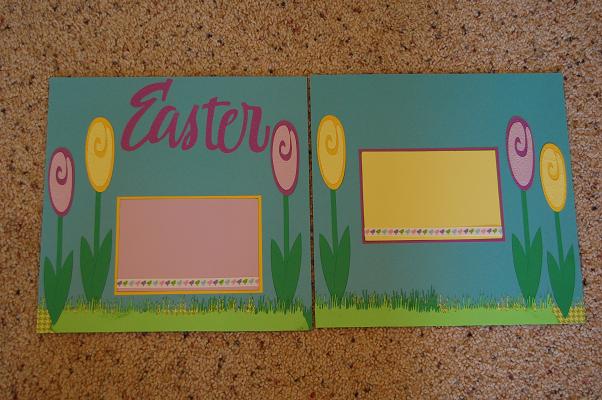
I decided to make a LO using stretched tulips for Easter. I took the tulips from Walk In My Garden and stretched them on my gypsy. I put all three pieces on the mat and grouped them together and then stretched them. I copied two more. On the third set I reduced the size a little bit.

I embossed the tulip flowers in my cuttlebug using dots and paisleys.


The grass is from Everyday Paper Dolls. I welded two images together and cut it out in three different shades of green. I inked the grass and tulip stems with a green stamp pad.

Spring Stretch ~ Gypsy challenge


This week's Gypsy Challenge is called Spring Stretch. It is a spring theme using the stretch and flatten technique on the Gypsy. In my family, spring means baseball season so I did a small baseball embellishment for my first project.

I used the Baseball Cartridge and Base Camp. I put all three layers of the baseball player on my mat and grouped them. Then I stretched them to the size I wanted. I then put the letters and the shadows on the mat, grouped them and stretched them. I welded the shadow letters together and then welded them to the blackout shadow of the baseball player. I did not weld the letters (that I cut out in blue) because there was no overlap.

I used blue for the uniform and letters because it matches my son's uniform color.

Saturday, March 27, 2010

Hush Little Baby ~ Gypsy Challenge


This week's Gypsy challenge was using a Nursery Rhyme theme and stretching and flattening your images by un-highlighting the aspect ratio button (looks like a chain and is located right under the width and height on the basic menu). This was challenging because I wanted to be able to use my creation. I was originally thinking about using the grandfather clock from Heritage and make a Hickory Dickory Dock page, but my youngest is probably too old for that LO!

So, I decided on this one ~ Hush Little Baby and turned it into a scrapbook page for a friend who is having a baby girl any day now. I made her the zebra diaper cake as a shower gift shown in an earlier post here.

I stretched and flattened rectangles from George to make the border around the page and the title. I used the font from A Child's Year for the title and stretched that as well. The stroller is from Designer's Calendar and the Rattle is from Stamping. Both were stretched to fit the space.

I used a little ribbon and some clear gems to finish the look. Now, we just need baby!!